

Custom Guitar Decal Guide: From Design to Lasting Finish
You've got the design file, the logo looks sharp, and the guitar is sitting on the bench. The mistake many people make at that point is treating every surface the same. A custom guitar decal is only as safe as the finish underneath it, and the wrong product on the wrong lacquer can turn a quick cosmetic update into a refinish job.
Why Your Guitar Finish Should Decide the Decal Method
A player usually notices the problem too late. The decal looked fine on day one, then the edges started to lift, the graphic turned cloudy, or the clear coat reacted and dulled the whole area. On guitars with older or more delicate finishes, that's not bad luck, it's chemistry.
Finish first, decal second
The finish is the control point. Nitrocellulose lacquer is common on many vintage and boutique instruments, and it's porous and solvent-sensitive enough that the wrong adhesive or clear coat can create trouble fast. Polyurethane and polyester are generally denser, but they can still react badly to low-grade vinyl, plasticizer migration, or aggressive finishing products.
That's why a compatibility-first workflow beats a generic decal guide every time. A hidden-area test on the back of the headstock, inside a cavity cover, or under a pickguard tells you more than a product photo ever will. If the test spot softens, discolors, or stays tacky after a wait, the visible area doesn't get the decal.
Practical rule: If you can't identify the finish, treat the guitar as high risk until a concealed test proves otherwise.
For a finish-specific compatibility workflow, use this material compatibility chart before you order anything. That's the step most first-time installs skip, and it's usually the expensive one to skip.
A custom guitar decal isn't just decoration. It can be identification, restoration, branding, or a low-cost visual change, but only if the finish can carry it safely. If the guitar is a keeper, treat the surface like the deciding factor, not an afterthought.
Designing Artwork That Prints Clean on a Decal
Clean artwork starts with the file, not the printer. A great design can still come out rough if it was exported from a small image, flattened the wrong way, or built for the wrong transfer method. For guitar work, the hard-surface route and the apparel route are not interchangeable.
File setup that saves reprints
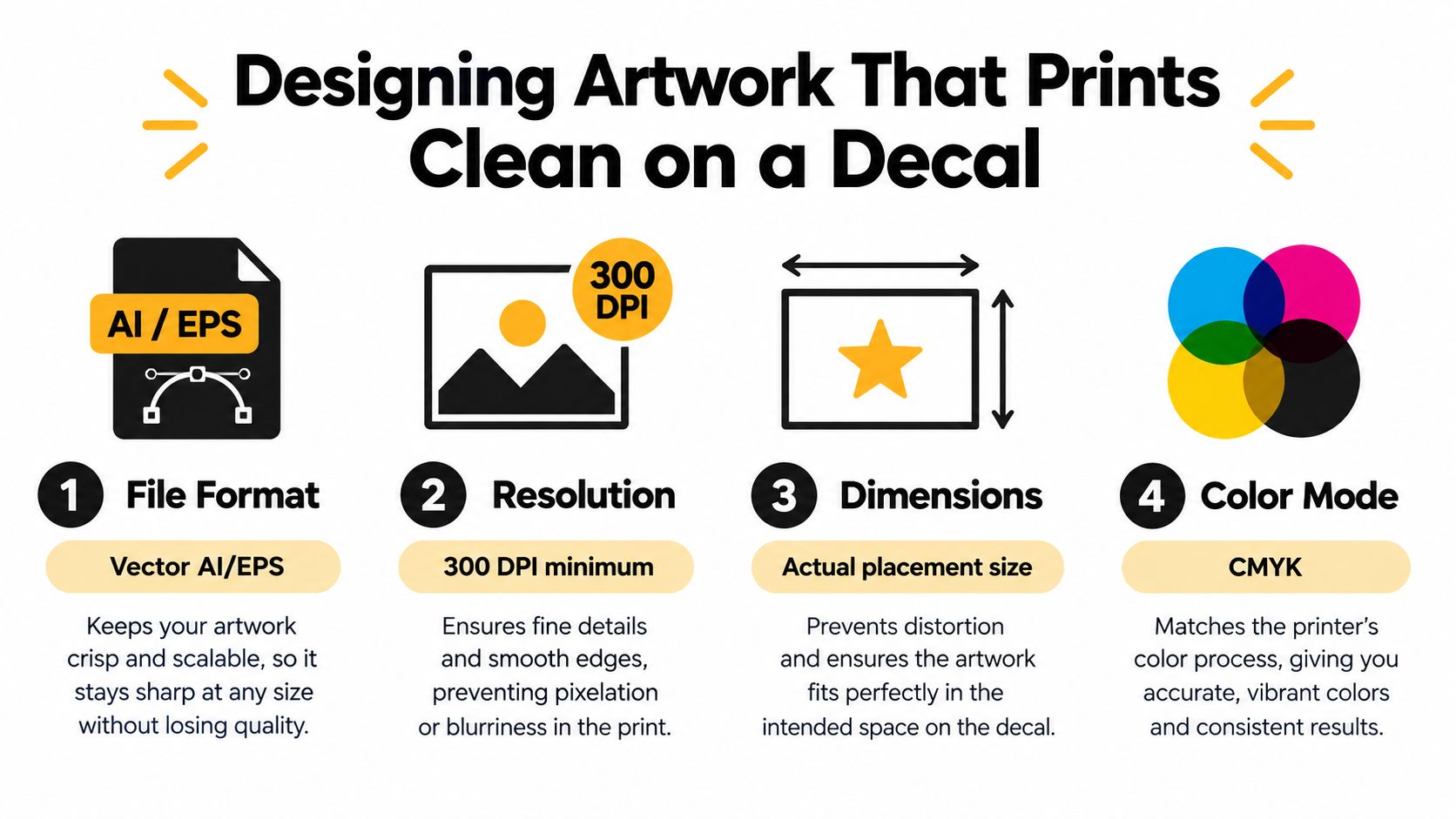
For a guitar headstock face, pickguard, or case panel, UV-DTF is the relevant hard-surface process. For a strap, gig bag, or tote, standard DTF is the fabric process, and it belongs on textiles, not on the instrument itself. If you're preparing a design for print, build it at the final placement size and keep the artwork at 300 DPI at that size so the edges stay crisp instead of softening through upscaling.
Transparent backgrounds matter more than they seem. A white box behind a logo reads as a mistake once it hits a colored body, while transparency lets the decal sit naturally against the finish. If you're working from an SVG and need a raster version for upload, a conversion tool like PDFWix image conversion tool can help preserve clean edges during export.
File rule: If the artwork is tiny on screen, it'll print tiny in structure too. Build it at actual placement size, not “close enough.”
An internal prep guide like how to prepare artwork for printing is worth following when the design includes thin outlines, small type, or layered elements. Fine details can vanish faster than you expect once they go through transfer and alignment.
What to verify before upload
- Dimensions: Match the final placement size, not the canvas size you started with.
- Color mode: Use the mode your print workflow expects, then avoid last-minute conversions that shift color.
- Transparency: Keep the background clear unless you intentionally want a solid block.
- Mirroring: Confirm whether the system expects a mirrored file or handles it for you. Mistakes here are common and wasteful.
If you're building multiple graphics for a hard surface, Upload Your Own UV DTF Gang Sheets is the kind of format that makes sense when the art is already finalized and you want several decals on one layout. For a guitar, that only matters once the substrate is actually hard and smooth enough for UV-DTF to behave properly.
Matching the Decal Type to the Surface You Are Customizing
Guitar buyers often ask the wrong question first. They ask which decal is strongest, when the actual question is which transfer method matches the surface, the wear pattern, and the heat tolerance. The right answer changes completely between a fabric strap and a lacquered headstock.
Three methods, three different jobs
DTF is built for fabric. It belongs on cotton, blends, straps, gig bags, and similar soft goods where a heat press can do its job. UV-DTF is built for hard, smooth surfaces, which makes it the more natural choice for pickguards, headstock faces, cases, acrylic parts, plastic accessories, and similar non-fabric items. Traditional waterslide decals still matter for finish work under clear coat, especially when you want a graphic that lives beneath the top finish rather than on top of it.
| Method | Best Substrate | Heat Required | Durability | Skill Level |
|---|---|---|---|---|
| DTF | Fabric straps, bags, apparel | Yes | Strong on textiles | Moderate |
| UV-DTF | Hard, smooth guitar accessories and panels | No | Strong on hard surfaces | Moderate |
| Waterslide | Sealed guitar finish under clear coat | No direct heat | Depends on finish system | Higher |
A useful way to pick a method is to ask where the graphic has to survive. If it will rub against strings, fingers, or edges, the placement needs more caution than a wall display or a case label. For inspiration on graphic style, a guitar tattoo inspiration gallery can help you think in shapes and contrast, but the substrate still decides the process.
The practical limit is simple. Use DTF for cloth, UV-DTF for hard surfaces, and waterslide when you're willing to work inside a finish system instead of on top of it. If the instrument has a delicate finish, the safest-looking option on paper might still be the wrong one in the shop.
UV-DTF transfer sheets are the relevant reference point when the surface is hard and the graphic needs to sit cleanly without heat pressing.
Prepping the Finish So the Decal Actually Sticks
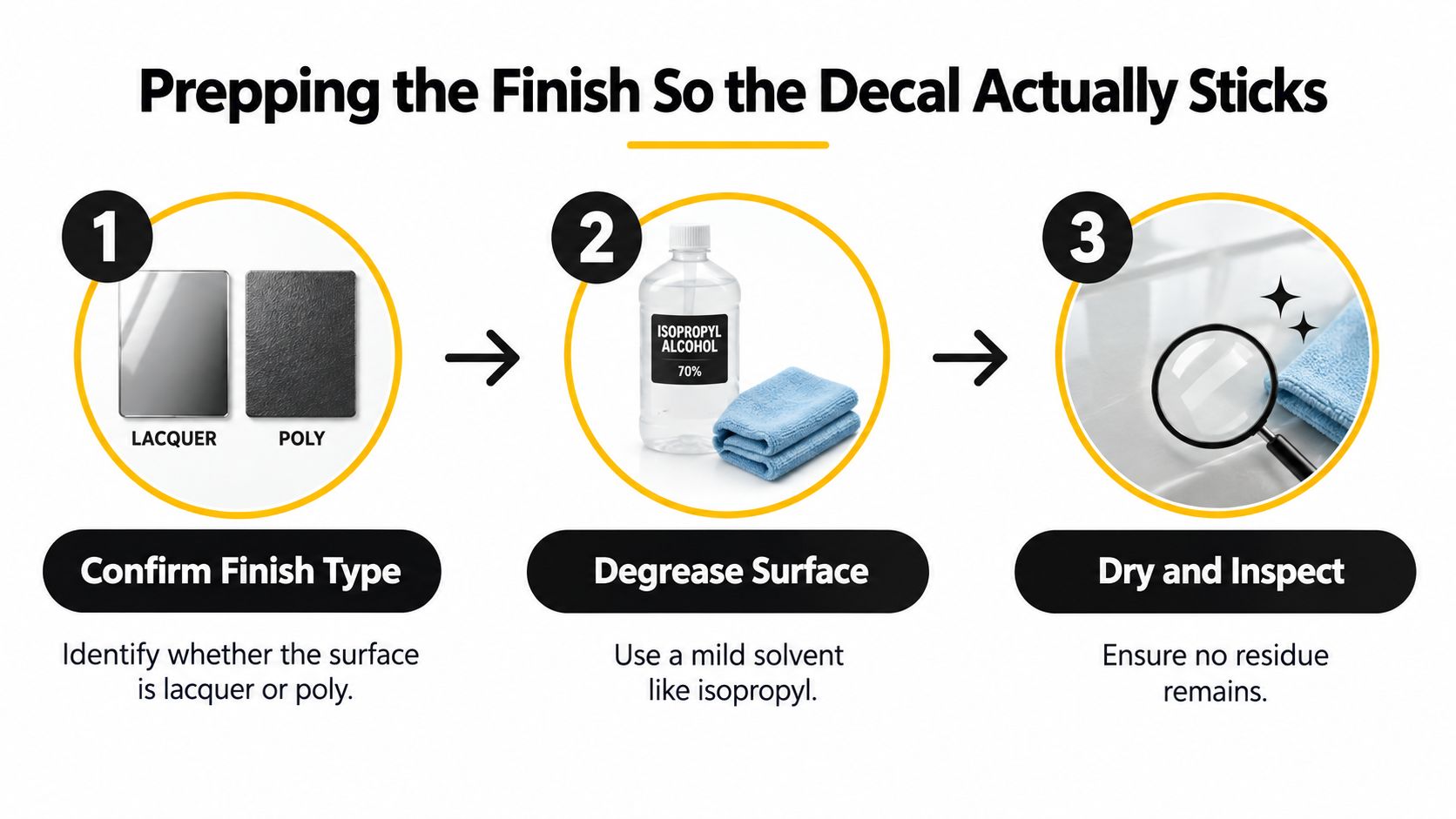
The prep routine is where most failures are either prevented or locked in. If the finish still has polish residue, silicone, wax, or dust in the placement area, the decal may look fine at first and then start to fail at the edge. On guitar work, the surface prep is not cosmetic, it's structural.
A short routine that catches expensive mistakes
Start by identifying the finish type as accurately as possible. Then clean the placement zone with a mild solvent that's safe for that finish, and don't assume the same cleaner works on nitrocellulose and polyurethane. If the manufacturer recommends a light scuff, use it sparingly and only on sealed surfaces, because bare wood can absorb moisture and finishing products in ways that weaken adhesion.
The hidden-area test matters more than you might expect. Put a small swatch on a concealed spot, wait 24 to 72 hours, and inspect for softening, discoloration, or tackiness before exposing the visible surface. If the sample changes, stop there.
A decal that looks perfect on the first afternoon can still fail after the finish and adhesive settle into each other.
Use low-tack tape to map the placement before committing. That lets you check alignment against the strings, pickguard edge, or headstock curve without pressing the graphic into the finish too early. Cold conditions are another common problem, because low temperature can make adhesives less willing to bond cleanly.
A few things routinely cause trouble:
- Skipping the wipe-down: Dust and polish residue create weak spots.
- Pressing over silicone residue: The decal may bond unevenly and later lift.
- Testing only on the visible area: That's the most expensive place to learn a lesson.
If the finish is unknown, behave like the instrument is one bad reaction away from a repair. A few extra minutes at the bench is cheaper than correcting solvent damage later.
Applying UV-DTF and DTF Decals Without Wrinkles
Once the surface is ready, the application path depends on the material. Hard-surface UV-DTF behaves differently from fabric DTF, and treating them the same causes wrinkles, stretch marks, and edge lift. The tool in your hand matters, but the sequence matters more.
Hard surfaces need center-out pressure
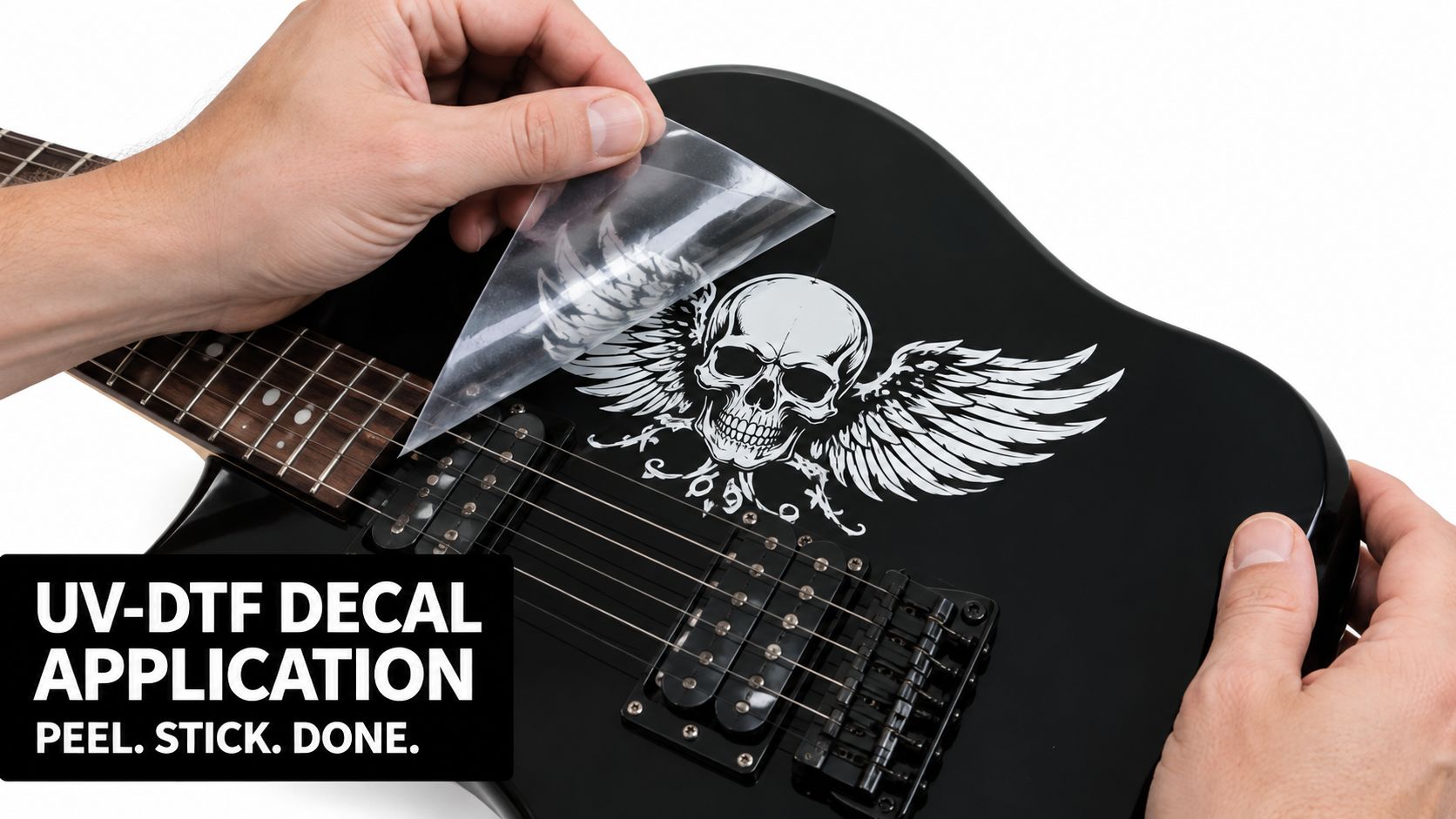
For UV-DTF, peel the printed carrier, align the adhesive side over the target, and press from the center outward with a squeegee or felt-edge tool. Keep the pressure even so air doesn't get trapped under the film, then peel the top carrier back at an angle while maintaining light tension on the bonded graphic. That angle keeps the film from yanking up a corner you just laid down.
Avoid the high-tension edges on headstocks and keep graphics away from string contact zones on pickguards. Those spots get touched constantly, and a decal that survives one session can still fail after repeated abrasion. A smooth, rounded application is better than an aggressive stretch that looks clean for five minutes and then curls later.
Fabric needs heat and a finishing press
For DTF on a strap or bag, pre-press the fabric to drive off moisture, position the transfer, and press at the temperature and time specified by the transfer maker. Peel warm or cold only as directed, then repress with a finishing sheet if the system calls for it. That second press is not a luxury step, it locks the adhesive and smooths the hand.
Placement rule: If the surface flexes, heat it like fabric. If it doesn't flex, treat it like a hard substrate and stop borrowing apparel habits.
The big beginner mistakes are simple. People stretch the film while aligning it, peel the carrier too fast, or skip the final repress that secures the transfer. Those are fixable mistakes on a tote bag. On a guitar accessory, they become visible every time the light hits the surface.
Troubleshooting Silvering, Edge Lift, and Clear-Coat Disasters
The three failures I see most often all tell different stories. Silvering usually points to trapped air. Edge lift points to pressure, texture, or placement. Clear-coat damage points to chemistry, and that one is the hardest to forgive because the finish can go from usable to ruined quickly.
Start with the failure location
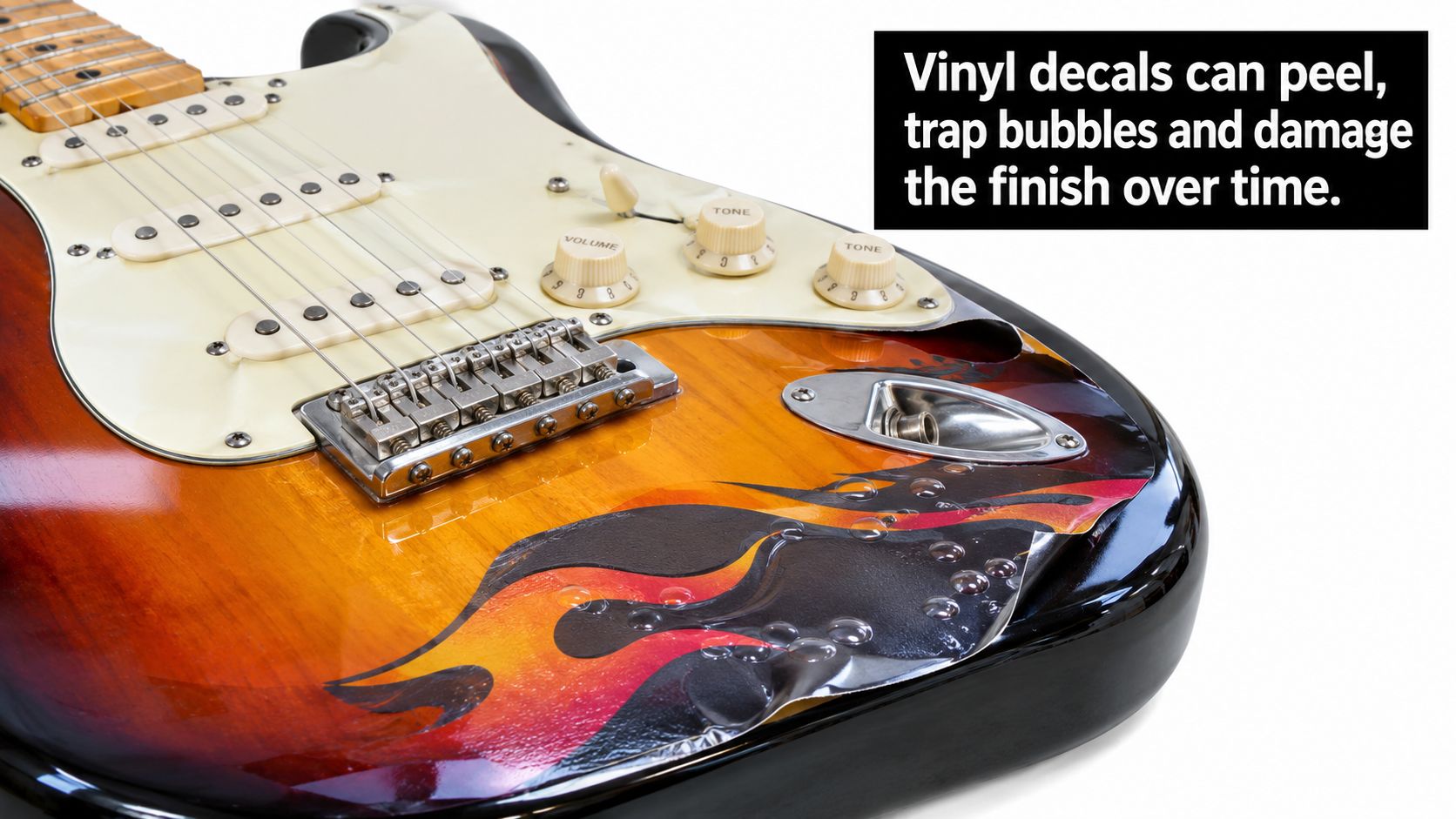
If the problem is in the middle of the graphic, you're usually looking at silvering. On UV-DTF, warming the film and working out the trapped air can help, and a small prick plus reseal may save the piece if the defect is local. If the issue is at the corners or along the outline, the edge likely never got enough burnish pressure, or it crossed a micro-ridge in the finish.
If the clear coat reacted, stop treating it as a decal issue. Aggressive aerosol lacquer, especially higher-acetone blends, can soften, wrinkle, melt, or discolor some decal films, and the only real fix may be stripping the damaged area and rebuilding the finish with a more compatible sealer. Always test on scrap first when you're adding finish over a decal.
Color shift is a quieter problem but still real. A graphic that looks neutral on white backing can pick up a greenish or amber cast under a tinted finish, especially when the clear layer has its own color. That's why a print-and-hold test on scrap wood matters more than a screen preview.
Ask one question first, did the failure start at an edge, in the middle, or in the clear coat?
That single question saves time because it points you toward the right fix. Edge problems are usually mechanical, middle problems are usually air or pressure, and finish problems are chemical.
Durability, Care, and Removal Without Damaging the Finish
A successful install should still be easy to live with. That means the decal needs to hold up on a gigging instrument, not just look good under shop lights. A compatible clear coat helps on high-touch surfaces, while a wall-hanger can sometimes do fine with less protection if the finish system is stable.
For straps and bags, follow the care guidance for the substrate, not the graphic alone. Hand-washing is safer than machine-washing for decorated accessories, and heat is the enemy of many adhesive systems over time. When removal is necessary, gentle heat, a plastic blade, and a residue remover tested on the specific finish are the least risky sequence.
The sustainability question needs a straight answer. A long-lasting decal can keep an instrument out of a repaint, but a low-quality decal that peels or yellows can create more waste and repair work later. Durability and removability don't automatically move together, so choose the placement and adhesive with the finish in mind.
Keep this short checklist inside the case lid:
- Identify the finish before ordering.
- Test a hidden area before the visible area.
- Use the right transfer type for hard surface or fabric.
- Protect the graphic only with a compatible clear coat.
- Remove slowly with heat and a plastic tool if needed.
If you want hard-surface UV-DTF work or apparel-grade DTF printed with the right transfer method, Raccoon Transfers handles both kinds of jobs with artwork uploads and custom transfer formats. For a guitar project, the key is matching the substrate first, then choosing the decal system that won't fight the finish. Visit Raccoon Transfers when you're ready to turn a logo or graphic into something that survives the instrument it goes on.