Black Polyester Shirts: Custom Printing Guide 2026
You've just pressed a bright white logo onto a black polyester shirt. It looks perfect when the platen opens. The edges are sharp, the white is clean, and the garment feels ready for delivery. The next morning, the white has a pink, gray, or reddish cast, and the customer is holding the shirt under the light asking what happened.
That failure usually isn't caused by the artwork. It comes from treating polyester like cotton. Black polyester shirts need a controlled workflow that accounts for dye migration, fiber heat response, surface finishes, moisture, pressure, and cooling. The right blank and transfer can produce a clean, durable result. The wrong combination can create scorching, lifting, shine, or a print that changes after it leaves the shop.
Why Black Polyester Shirts Need Their Own Workflow
The white logo looked fine when it came off the press. I've seen that exact result turn yellowish or pinkish by the next morning, especially on dark athletic garments. The delay makes the problem frustrating because the operator may already have packed the order before the dye has visibly migrated into the print.
Polyester's disperse dyes can move under heat, and black garments often contain a dense dye load. The transfer may bond successfully while the dye continues moving into the lighter ink layer. That's why a shirt can pass a quick visual inspection and still fail later.
Three problems appear repeatedly
Dye migration is the most recognizable failure. The print starts white and develops a tinted cast after cooling, storage, or washing. A dye-blocking transfer build can reduce that risk, but it doesn't replace a test press on the actual shirt.
Fiber scorching and glazing happen when the platen delivers too much heat, pressure, or dwell time. The fabric may develop a shiny rectangle, a flattened texture, or a permanently altered surface. Black shows these marks clearly, particularly on lightweight performance knits.
Adhesive rejection occurs when moisture-wicking finishes, silicone treatments, softeners, or other surface coatings keep the hot-melt adhesive from making consistent contact. The transfer may look attached at first, then lift around fine details or along the edges.
Practical rule: Treat the garment label, finish, and dye behavior as production data, not background information.
Black polyester shirts are common in uniforms, athletic programs, corporate apparel, golf wear, and promotional orders. Even a shop built around cotton will eventually receive them, and a repeatable workflow matters more than memorizing one universal temperature.
For larger programs, an enterprise print on demand platform can help organize garment selection and fulfillment, but the physical press decision still belongs to the operator. The platform can't compensate for a polyester blank that rejects adhesive or a transfer pressed beyond the fabric's safe window.
What Makes Black Polyester Different From Cotton
Polyester is a hydrophobic fiber, so it sheds water instead of absorbing it like a sponge. The American Chemical Society identifies polyester's moisture regain at about 0.4% in its educational material, which explains both its quick-drying behavior and its limited buffering of perspiration against the skin (American Chemical Society guidance on polyester moisture behavior).
That surface behavior matters at the press. DTF adhesive has to grip a relatively slick synthetic surface rather than soak into open cotton fibers. A moisture-wicking finish can make that surface even more resistant, so a short pre-press and a clean garment face are important before positioning the film.
Polyester is also thermoplastic. Heat can soften and reshape the polymer, and excessive platen exposure can glaze the knit, flatten its texture, or distort the garment. Don't assume the transfer supplier's cotton setting is safe just because the adhesive needs heat.
Dye chemistry changes the failure pattern
Polyester garments commonly use disperse dyes. Under excessive heat, those dyes can become mobile and migrate toward the transfer film. A black shirt therefore presents a different problem from a black cotton shirt. Cotton may show poor adhesion or weak opacity, while polyester can contaminate a clean white layer after the press cycle.
The fiber's history also explains its place in apparel. Polyester was first patented in 1941 by John Rex Whinfield and James Tennant Dickson, DuPont acquired the rights in 1946, and the fiber entered the U.S. market under the Dacron brand in 1951, according to the historical overview in this review of polyester's development. Its wrinkle resistance, low maintenance, and durability helped move it from a laboratory material into everyday clothing.
Before pressing, inspect the shirt rather than relying on the fiber label alone:
- Feel the face fabric: A slick or unusually coated surface deserves a test transfer.
- Check the care label: Heat warnings and performance finishes can narrow your process window.
- Look for storage moisture: A garment stored in a humid area may need a brief pre-press.
- Inspect seams and panels: Uneven pressure can cause partial bonding even when the temperature is correct.
For a broader material comparison, the cotton versus polyester printing guide is useful before you build a standard operating procedure around one setting.
DTF and UV-DTF on Black Polyester Compared
DTF and UV-DTF solve different application problems, so the better choice depends on the garment's stretch, surface, and heat tolerance. Traditional DTF is made for fabric. UV-DTF is cured before application and is generally associated with hard, smooth surfaces, although some operators consider it for specialty applications where minimizing direct heat is the priority.
DTF is the practical fabric option
DTF uses printed film and hot-melt adhesive powder. The powder must activate and flow into contact with the polyester face, but the same heat that activates the adhesive can encourage dye movement. That makes the transfer build important. On dark polyester, ask whether the transfer includes a low-bleed or dye-blocking layer rather than assuming every DTF film will behave the same way.
DTF usually handles stretch and garment movement better because the transfer is designed to bond to fabric. It can also follow a performance knit more naturally when the film is thin and the adhesive is evenly cured. The trade-off is that the operator has to manage temperature, dwell, pressure, peel timing, and post-press cooling.
UV-DTF reduces direct heat exposure, with limitations
UV-DTF is cured with ultraviolet light before it reaches the garment. In applications where it is suitable, that can reduce the amount of heat used during placement and limit the opportunity for dye migration. The approach can produce crisp edges, but the finished hand may feel more like a surface decal than a flexible textile print.
Textured or highly elastic performance knits can expose the limits of a rigid or thicker application. Edges may remain more noticeable, and aggressive stretching can challenge the bond. UV-DTF is therefore not a universal substitute for fabric DTF. It's better considered when the blank is delicate, the application area is stable, and surface feel is less important than a quick, low-heat placement.
| Factor | DTF | UV-DTF |
|---|---|---|
| Primary fit | Fabric garments, including stretch apparel | Primarily hard, smooth surfaces, with specialty textile use requiring testing |
| Dye migration risk | Requires controlled heat and an appropriate low-bleed build | Can reduce direct heat exposure during application |
| Stretch tolerance | Generally better for athletic fabric | More dependent on decal construction and knit movement |
| Hand feel | Film-like, but can be relatively flexible | More surface-like and potentially more noticeable |
| Edge definition | Clean when the garment face is smooth and pressure is even | Crisp on stable surfaces, less predictable on textured knits |
| Best operational use | Athletic wear, uniforms, and repeat apparel work | Heat-sensitive applications or specialty small runs after testing |
Before ordering a UV-DTF option, read the UV-DTF printing guide and confirm that the intended surface is appropriate. For most black polyester shirts, fabric DTF remains the more natural production route.
Heat Press Settings That Prevent Dye Bleedation
The press should be calibrated for the shirt, not just the transfer. A reliable starting routine for black polyester is a 3 to 5 second pre-press at 250°F, followed by a main press around 285 to 300°F for 10 to 12 seconds with medium pressure. These are production starting points, not permission to skip a test on a new blank.
The pre-press flashes off surface moisture and relaxes the garment without giving the dye a long, aggressive heat exposure. Place the shirt flat, smooth the print area, and keep the platen clean. A dirty or uneven platen can create both pressure variation and unwanted marks.
Use a controlled sequence
- Pre-press at 250°F for 3 to 5 seconds. Keep the garment flat and avoid unnecessary dwell.
- Position the transfer. Make sure seams, collars, pockets, and thick labels aren't under the main design.
- Press at 285 to 300°F for 10 to 12 seconds. Use medium pressure. Excessive pressure can create a shiny box or crush the knit.
- Allow the film to settle. For a cool-peel film, wait roughly 10 to 15 seconds before lifting, unless the transfer supplier specifies another method.
- Finish lightly at 270°F for 5 seconds with a Teflon sheet when the transfer needs a final seal or a flatter hand.
Going hotter than 305°F increases the chance of dye movement, surface glazing, and fiber damage. Going too cool can leave the adhesive under-activated, producing edge lift even though the transfer initially appears attached.
| Step | Temperature | Time | Pressure | Peel | Notes |
|---|---|---|---|---|---|
| Pre-press | 250°F | 3 to 5 seconds | Light | No film | Remove surface moisture and flatten the area |
| Main press | 285 to 300°F | 10 to 12 seconds | Medium | Follow film specification | Stay within the transfer's activation window |
| Cooling pause | Room temperature | 10 to 15 seconds | None | Cool peel when specified | Let adhesive stabilize before lifting |
| Finishing press | 270°F | 5 seconds | Light to medium | Film removed | Use Teflon or parchment when appropriate |
The heat press temperature guide for polyester can help you compare supplier instructions, but the shirt's dye and finish still control the final decision.
Watch for three signatures. A reddish or gray halo around white ink suggests migration. Edge lift after cooling points to inadequate bonding, contamination, or insufficient activation. A plastic sheen around the print usually means the surface saw too much heat or pressure.
Preparing and Finishing the Printed Shirt
Preparation starts before the transfer touches the shirt. I check the size label, seam placement, fabric face, and care instructions first. A shirt can have the right polyester content and still perform poorly if its face has silicone, softener residue, or a heavy moisture-wicking coating.
Lay the garment on the platen and inspect the print area under side light. Side light reveals ridges, raised knit texture, and pressure problems that overhead lighting hides. If the shirt feels damp or has been stored tightly packed, pre-press it briefly and let it relax before positioning the transfer.
Cooling is part of the bond
A freshly pressed shirt shouldn't be hung immediately. While the adhesive is still pliable, gravity and fabric movement can shift the film edge or encourage a partially bonded corner to lift. Place the garment flat on a clean table and let it cool without stacking another shirt on top.
The finishing press is optional, not automatic. Use parchment or Teflon when the film supplier recommends a second press or when the surface needs a final seal. Skip it when the transfer already has the desired hand and another heat cycle would add unnecessary stress to a sensitive black knit.
A finishing press can flatten the surface and make the print feel more integrated, but too much pressure can create a broad sheen around the design. Keep the second cycle short and light. The objective is to stabilize the print, not reheat the entire garment.
Shop-floor observation: The cleanest-looking shirt at minute one isn't always the strongest shirt at delivery. Cooling, inspection, and a controlled second press decide whether the result stays clean.
Give the customer care instructions that protect both the transfer and the fabric's performance:
- Wash inside out in cold water: This reduces direct abrasion against the printed surface.
- Skip fabric softener: It can interfere with the transfer surface and may affect the shirt's moisture-wicking finish.
- Tumble dry low or air dry: High heat can stress the print and accelerate fading in dark synthetics.
- Never iron directly over the design: Use the reverse side or a pressing cloth.
- Avoid prolonged direct sun when possible: UV and heat exposure can accelerate fading in dark polyester, as noted in guidance on caring for polyester garments (polyester laundering and shrinkage guidance).
These instructions also address odor retention. Polyester absorbs little water, but odor-causing compounds can remain in its hydrophobic structure, so washing temperature, detergent choice, drying, and prompt laundering matter more than just telling the wearer to “wash cold.”
How to Source Shirts That Print Cleanly
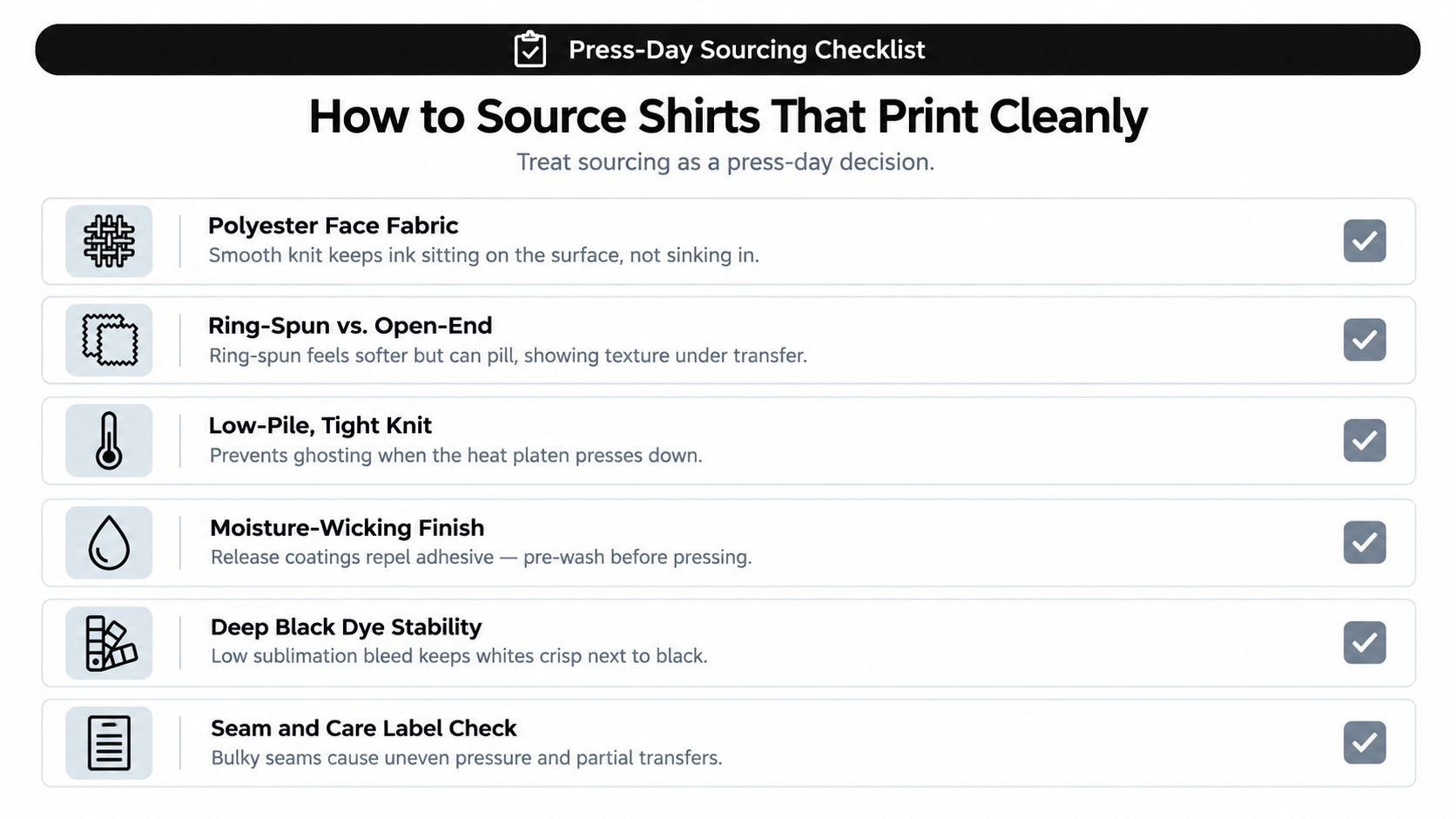
Sourcing determines how much margin you have at the press. A smooth, stable black polyester shirt gives the adhesive a consistent face. An uneven knit, overloaded dye, or silicone finish forces the operator to compensate with settings that may damage the garment.
Ring-spun polyester can feel softer, but softness alone doesn't guarantee a clean transfer. Open-end or coarse filament constructions may show more surface irregularity under fine lettering and narrow lines. If the knit texture remains visible through the film, no press adjustment will make a delicate design look perfectly smooth.
Read the construction, not just the color
Single-knit performance tees can be lightweight and flexible, but their open surface may reveal more texture. Interlock construction is usually more stable and tighter, which can help produce a cleaner print face. It may also retain more heat during pressing, so don't copy the settings from a thin single-knit shirt without testing.
The garment's weight affects heat flow. A performance tee around 140 to 160 GSM behaves differently from a fashion-weight shirt around 180 to 200 GSM. Those ranges are sourcing guides, not universal rules. Heavier fabric can absorb more heat and may need careful dwell adjustment, while a thin shirt can show shine or distortion quickly.
Dye quality deserves its own check. Cationic-dyeable polyester can accept certain print processes more predictably than a heavily saturated reactive black, but supplier terminology varies. Ask the blank distributor or mill what dye system and low-bleed testing they use, then verify the answer with a real transfer.
Run a small production test
Order a 5 to 10 piece test run before committing to a large uniform or retail order. Press the same artwork across the size range, inspect seams and panels, then wash-test at least one finished shirt using the care instructions you'll provide to the customer.
For sourcing research beyond a single blank catalog, compare Genpire print-on-demand alternatives with your current fulfillment route. A production partner may simplify garment access, but you still need to confirm the exact blank, fabric construction, and transfer method.
A sample can also expose the difference between fabric DTF and hard-surface applications. The Free DTF UV DTF Sticker Sample Pack includes DTF transfers for fabrics and UV-DTF stickers for hard surfaces such as tumblers, cups, and phone cases, with a $5 shipping fee stated in the catalog snapshot. Use it to separate the two application workflows rather than assuming one sample represents every black polyester garment.
Putting It All Together for Your Next Order
A black polyester order becomes manageable when every decision follows the garment. Start with the blank, identify the dye and surface finish, choose the transfer build, press one test shirt, inspect it after cooling, and only then move into production.
For a run of black polyester golf shirts, I'd first confirm whether the fabric is a smooth interlock or a lightweight single knit. Next, I'd press one shirt with the intended logo and hold it for inspection before touching the remaining pieces. If the white begins to tint, the problem needs solving at the transfer or blank level, not by merely adding more heat.
Quick reference for the press
| Parameter | DTF on Black Polyester | UV-DTF on Black Polyester |
|---|---|---|
| Primary use | Stretch fabrics and apparel | Specialty applications only after textile testing |
| Main temperature | Start around 285 to 300°F | Use the supplier's lower application range, often around 120 to 130°C when specified |
| Main dwell | About 10 to 12 seconds as a starting point | Short application dwell suited to the adhesive, not a fabric cure |
| Pressure | Medium, enough for contact without crushing the knit | Light to medium, depending on surface and decal construction |
| Peel | Cool peel when the film requires it | Transfer after the cured decal is properly seated |
| Preferred blank | Smooth, stable, low-bleed polyester | Stable surface with limited stretch and texture |
| Main risk | Dye migration, shine, or edge lift | Rigid hand, edge visibility, and poor stretch tolerance |
The five checks below keep repeat orders consistent:
- Confirm the shirt specification. Record fiber content, GSM, knit construction, finish, and dye information.
- Test one transfer. Use the actual artwork, color density, and shirt instead of a substitute blank.
- Verify platen temperature. A press display can drift, so check the platen with a suitable probe or temperature verification tool.
- Document the peel. Note whether the film lifted cleanly, dragged detail, or required a longer cooling pause.
- Log the wash result. Record changes in adhesion, color, hand, and shirt appearance before approving the full run.
The sustainability conversation also belongs in the sourcing discussion. Polyester has long been valued for durability and low maintenance, but black garments present a difficult end-of-life problem. A 2026 textile recycling report notes that infrared sorting systems can struggle to detect black textiles, causing some dark garments to move toward incineration rather than recycling (textile recycling and black garment sorting discussion). For brands, that makes take-back planning, design-for-recycling, and careful material selection part of the product decision.
Once the shirts are ready for sale, marketing still needs to match the production promise. Teams selling custom apparel can review apparel PPC and DSP strategies from Headline, but advertising a “premium” black polyester product only makes sense when the blank, transfer, care instructions, and quality checks support that claim.
The practical sequence is simple: source a stable blank, test for migration, keep the press controlled, cool the garment flat, and record what happened. Black polyester rewards consistency, not aggressive heat.
Raccoon Transfers provides DTF transfers for fabric apparel and UV-DTF stickers for hard surfaces, so you can choose the application method that fits the job instead of forcing one workflow onto every material. Visit Raccoon Transfers to upload artwork, build transfers for your next black polyester shirt order, and request clear application instructions for production.