
Full Color DTF Transfers: A Practical Guide for 2026
You've got the artwork open, the client wants it on a black tee, and the order is due fast. That's the moment full color DTF transfers become the practical answer, because they let you move from file to finished transfer without building screens, mixing spot colors, or turning a small job into a production headache.
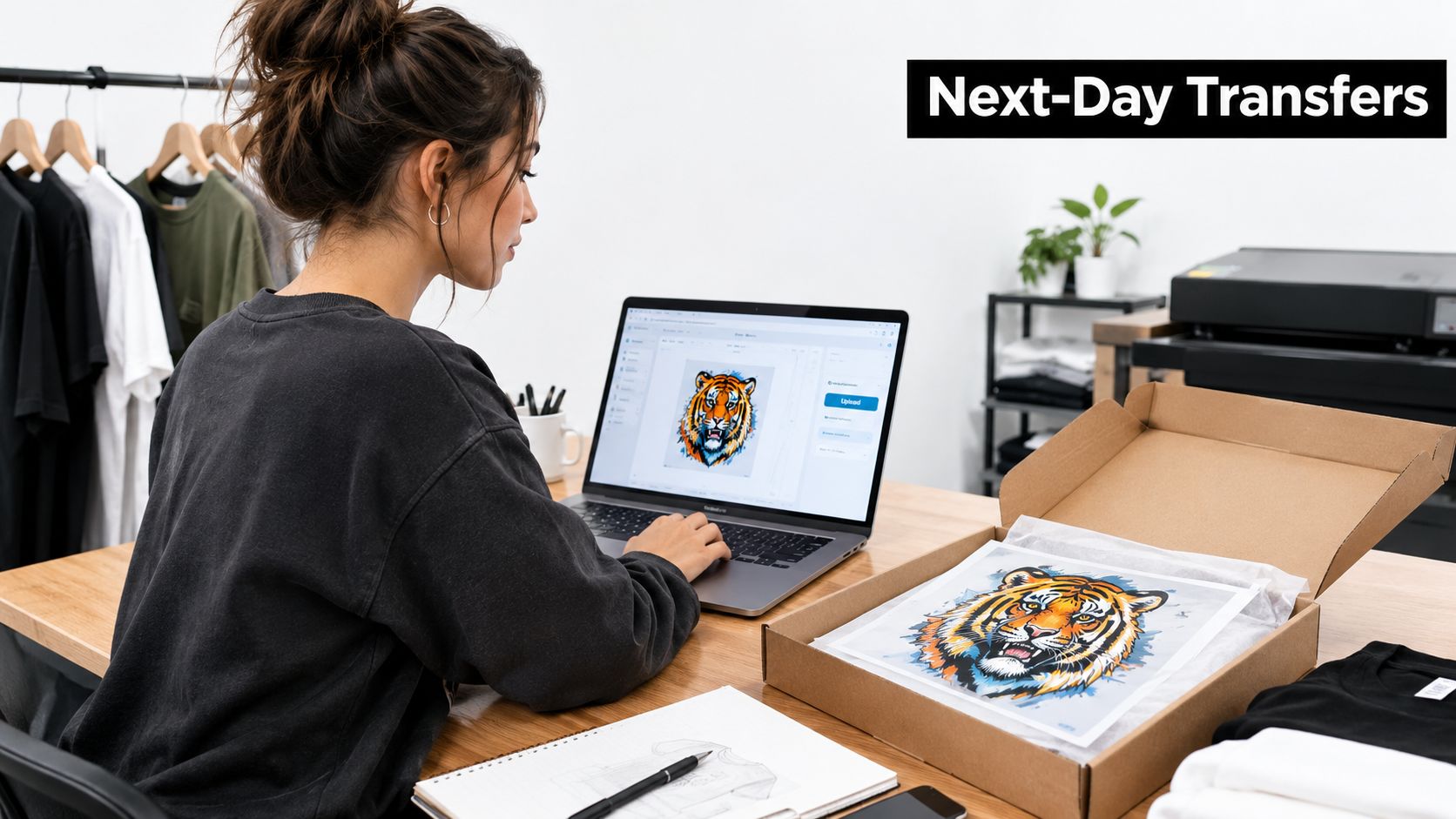
A midnight upload tells the whole story. A designer finishes the art, sends it to print, and by morning there's a ready-to-press transfer that can handle color, detail, and dark garments without forcing the shop into a big setup run. That's why DTF has become a default option for independent brands, promotional suppliers, and custom merch startups, especially when the order is too small for old-school screen work but too detailed for simple vinyl.
The bigger shift is structural, not trendy. Digital textile printing has been commercially available for about 18 years by 2021, still represented fewer than 10% of global textile-printing production, and was tied to a global printed-textiles market of about USD 146.5 billion with digital output above 3 billion square meters in the cited industry status report (imaging.org report). That's the backdrop for why buyers keep choosing DTF when they need flexibility, quick turnaround, and no screen minimums.
Why Full Color DTF Transfers Are Everywhere Now
A small apparel brand may receive one request for a birthday shirt and the next for a short event run. DTF can handle both from digital artwork, without rebuilding the setup between orders. That shorter path from approved file to press-ready transfer explains much of its appeal.
Why small brands keep reaching for it
The practical advantages are clear. Artwork can change without new screens, multicolor designs aren't capped by a fixed color count, and short runs become economically practical because setup work stays limited. These conditions suit seasonal shops, event sellers, and niche brands whose next design may have little connection to the previous one.
Practical rule: If the art changes often, the garment mix changes often, or the order size is unpredictable, DTF usually earns its place in the workflow.
The method also matches how customers buy apparel. One graphic may need to work on shirts, hoodies, and promotional pieces, while the buyer may want only a small quantity. DTF accommodates that variety without requiring a separate screen setup for every design. Buyers evaluating the environmental side can cut carbon with Gegan and compare broader production choices instead of treating sustainability as a slogan.
The production benefit is control over variables that used to demand more preparation. A digital file can move into production without fixed plates or screens, but turnaround still depends on printing, powder application, curing, and pressing. The method is a strong fit for small batches, mixed fabrics, and detailed artwork, provided those steps are configured consistently.
Size-based ordering reflects the same model: buyers select a graphic size rather than ordering decoration garment by garment. That format suits someone who already has approved artwork and needs a press-ready transfer, while leaving the final garment choice and application stage to the buyer.
What a Full Color DTF Transfer Actually Is
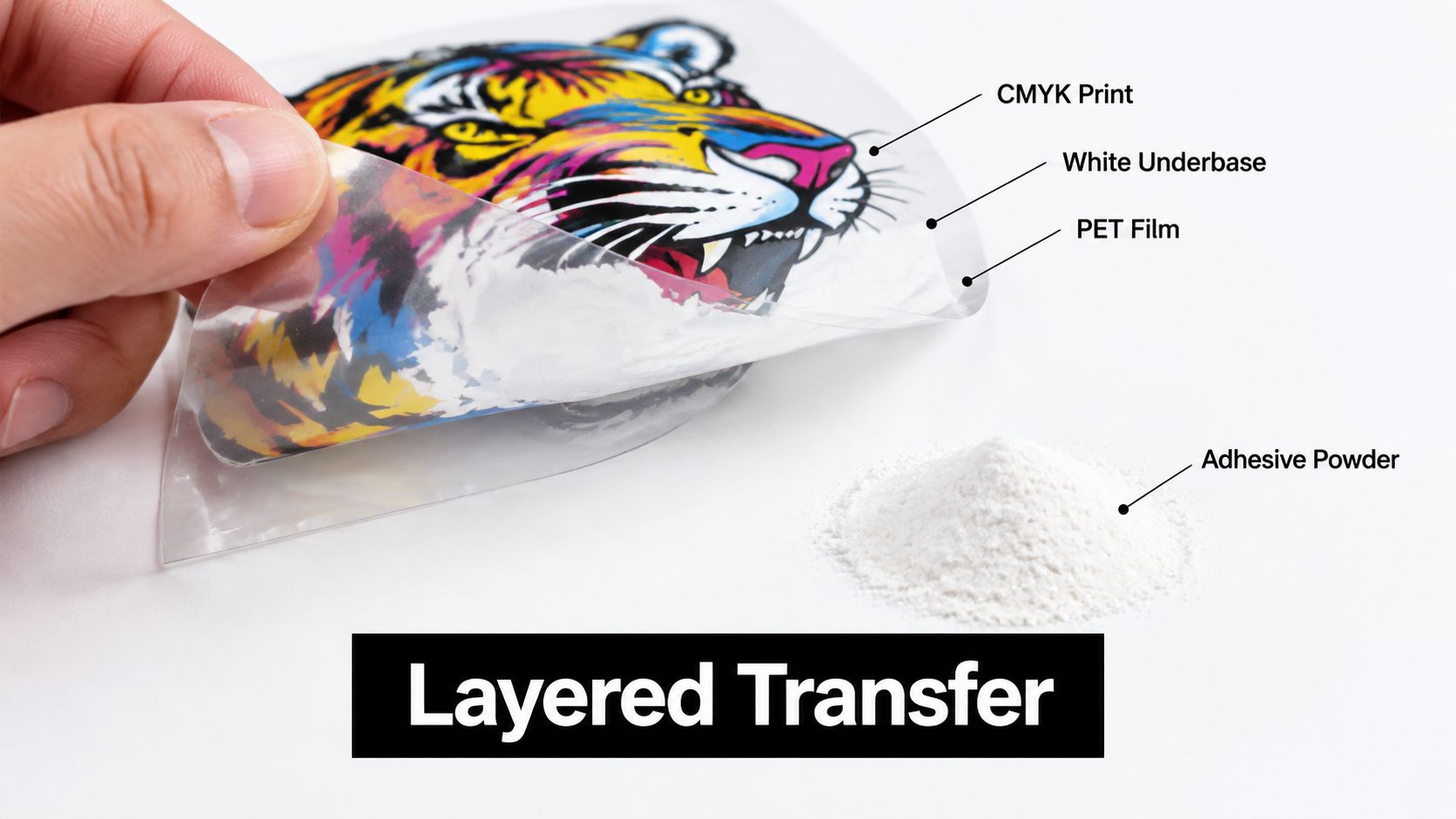
A full color DTF transfer is a layered print system. The base is a coated film, the middle is the printed image, and the bonding layer is heat-activated adhesive. During pressing, those layers move from the film onto fabric. If one layer is poorly prepared, the defect may appear as dull color, lifting edges, or cracking after washing.
The three layers that matter
CMYK ink creates the visible artwork, including gradients, fine lines, and mixed colors. White ink sits beneath the color where opacity is needed. On a dark garment, it separates the artwork from the fabric so the image remains readable instead of blending into the shirt.
The adhesive is thermoplastic polyurethane, or TPU powder. After curing, it forms the layer that bonds the printed image to the textile under heat and pressure. Powder coverage matters because uncovered areas may bond weakly, while excess powder can create rough edges or unwanted texture.
The transfer works only when these materials function as one system. Film affects release, ink affects color and opacity, powder affects adhesion, and the garment affects how the finished image stretches and washes.
Why “full color” really means variable color control
“Full color” describes the digital control available across the artwork. A file can contain gradients, fine detail, and many colors without requiring a separate physical screen for each spot color. That makes the process suitable for artwork whose appearance depends on smooth transitions or small tonal changes.
A screen preview still cannot answer every production question. The buyer needs to match the ink stack and adhesive to the garment, then confirm that the press recipe suits the fabric. A size-based catalog listing illustrates the basic promise, but understanding the layers matters more than choosing an image size alone.
Production truth: Color survives when the underbase, powder coverage, garment, and press settings work together.
That principle also explains why a bright file can produce a poor finished print. The artwork may be correct, while the failure comes from an uneven white layer, incomplete adhesive coverage, or a press setting that does not deliver enough heat, time, or pressure. Durability is therefore a production result, not a built-in label.
How the Transfers Are Made Step by Step
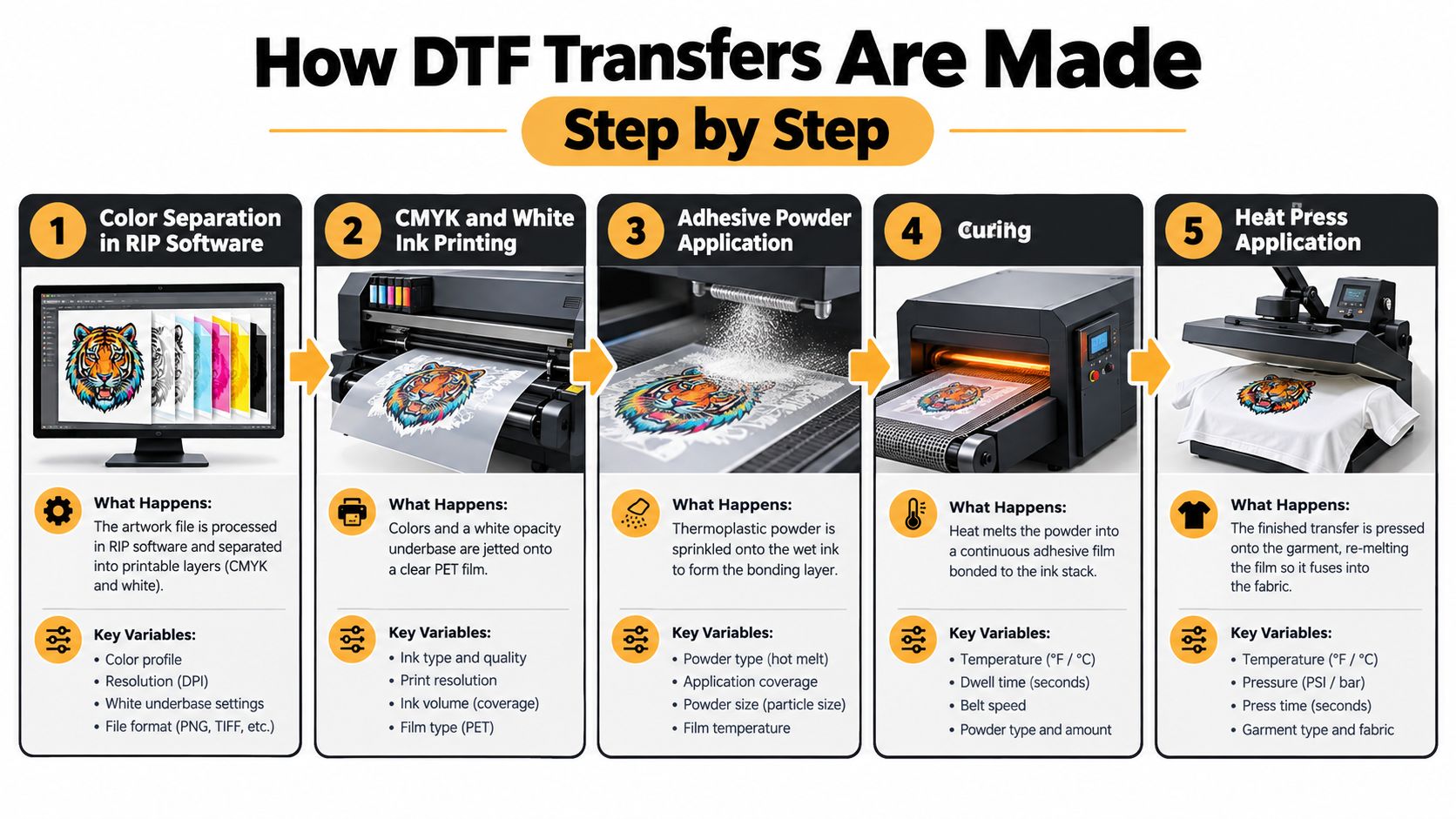
The process starts before any ink touches film. Artwork is separated in RIP software, which prepares the file for print and decides how the color stack will be laid down. That matters because the printer isn't just reproducing pixels, it's building a transfer that has to survive heat, stretch, and washing.
The print stage
The printer lays down the CMYK image first, then adds white ink where opacity is needed. On dark garments, that white underbase is what keeps the colors from fading into the background. On light garments, it still affects how the image feels and holds together.
After that, the transfer is still wet, and that timing matters. The adhesive powder has to land while the ink is tacky so it can mechanically anchor to the printed surface. If the powder application is uneven, you'll see it later as gritty edges, weak bonding, or stray adhesive where it doesn't belong.
Operator rule: Wet ink plus even powder distribution beats a visually perfect print that was dusted too late.
The cure and press stages
Curing turns loose powder into a continuous adhesive film. That step is where heat, time, and uniformity matter, because under-curing leaves the powder under-bonded and over-curing can damage the ink layer, the film, or the garment during press. The final heat press then re-melts that cured film into the textile so it fuses with the fabric surface.
That's why production teams track temperature, dwell time, pressure, and peel condition instead of treating them like generic machine settings. If the recipe drifts, the result can be weak adhesion, poor edge finish, or a transfer that looks good on day one and fails after a few washes. A printer should be able to tell you what film, powder, and press settings they use, not just promise that the output is “high quality.”
For a process walkthrough from another shop's perspective, this internal guide on how to make DTF transfers is the right companion read. The useful takeaway is simple, the transfer is not one step, it's a sequence of controlled variables.
DTF vs Screen Printing, DTG, and Heat Vinyl
Buying the wrong decoration method usually comes from asking the wrong question. The better question is not “Which method is best?” It's “Which method makes sense for this volume, this garment mix, and this design?”
| Method | Setup cost | Color limits | Fabric range | Best run size |
|---|---|---|---|---|
| DTF | Low setup burden | Full color, no fixed color count | Broad fabric compatibility | Short runs and mixed orders |
| Screen printing | Higher setup burden | Depends on screen count | Broad, but setup is less flexible | Larger runs with repeated art |
| DTG | Low to moderate setup | Full color, but garment and pretreat matter | Best on specific fabric types | Small, art-focused runs |
| Heat transfer vinyl | Low setup burden | Limited by cut colors and layering | Good for simpler apparel work | Names, numbers, and simple graphics |
Where each method earns its keep
Screen printing still makes sense when the same design runs repeatedly and the setup can be amortized. DTG is useful when the image belongs directly on the shirt and the shop is set up for that workflow. Heat vinyl is fine for simple lettering, numbers, and straightforward shapes, but it gets slower and clunkier as artwork complexity rises.
DTF sits in the middle of that map. It handles full color, works across many garment types, and avoids the weeding and color-by-color setup that can slow smaller jobs. It also avoids the “too complicated for vinyl, too small for screens” trap that pushes a lot of orders into expensive custom handling.
For a deeper side-by-side read on garment decoration choices, this guide on DTF vs DTG printing is a practical follow-up. The key decision rule is blunt, if your orders are varied and your graphics are detailed, DTF often wins on workflow, not just on appearance.
Durability, Washes, and What Actually Decides It
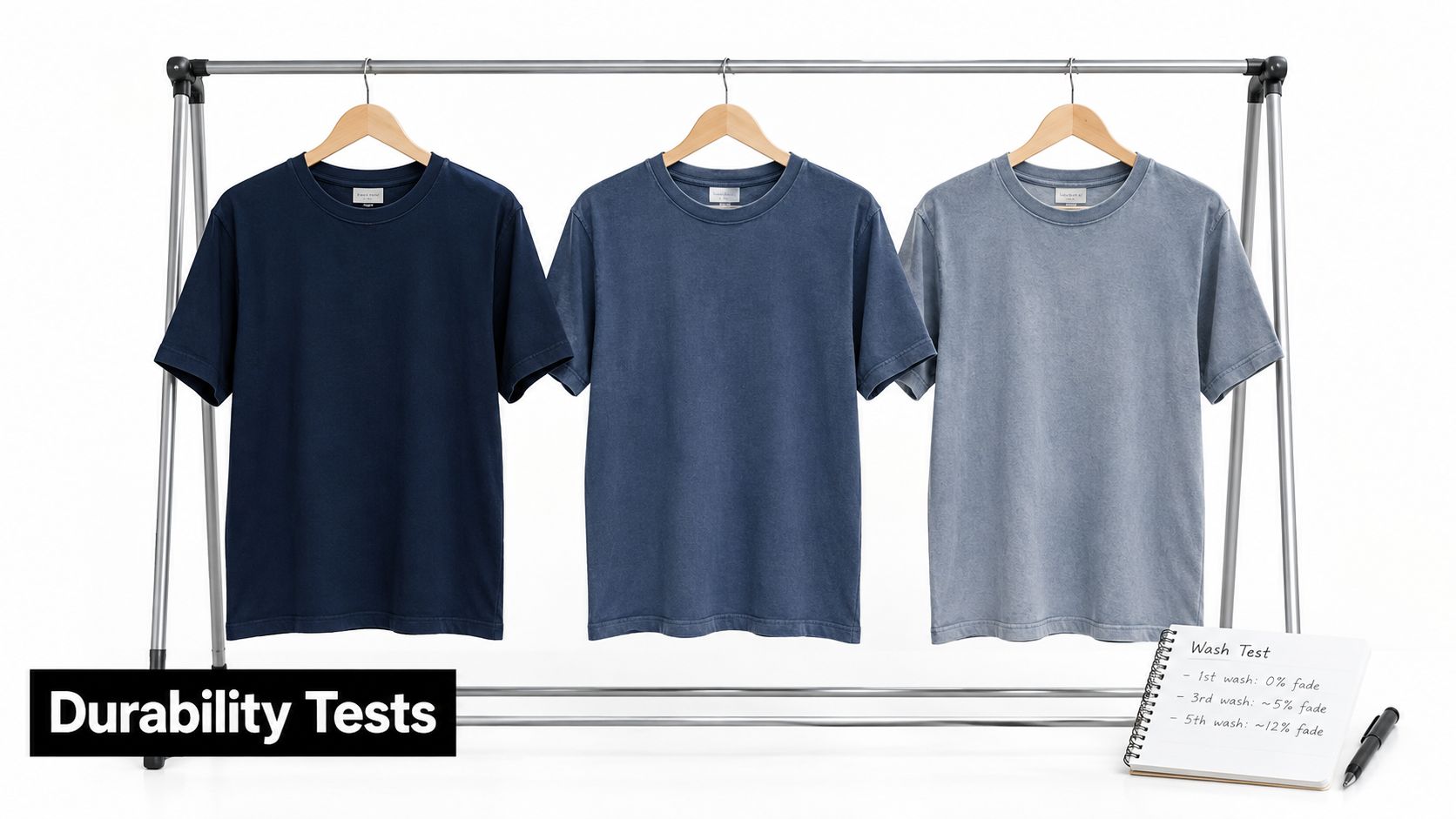
A claim like “it lasts for 50 washes” sounds reassuring, but it's not a production spec. Wash life depends on the washer, detergent, drying method, cycle count, specimen details, and pass/fail criteria, which means the number only matters when the test conditions are known. Without that, the number is marketing, not a measurement.
Test durability in four parts
Edge adhesion tells you whether the perimeter of the transfer is staying locked down or starting to lift. Stretch recovery matters when the fabric moves with the body and the print needs to flex without cracking. Surface smoothness shows whether the cured film settled cleanly or left gritty deposits and uneven texture. Color fade is the visual loss most buyers notice first, but it isn't the only failure mode.
Independent testing found that DTF and screen-printed images were the most resistant among the methods tested, while still showing gradual color loss during washing, using cotton and polyester substrates with household laundering at 40°C and assessing both washing and rubbing resistance (vat.ft.tul.cz study). That's useful because it confirms what a shop should care about, resistance is conditional, not absolute.
What buyers should ask before a bulk order
- Garment fiber: Cotton, polyester, and blends don't behave the same under heat and laundering.
- Press recipe: Temperature, dwell time, pressure, and peel timing should be stated clearly.
- Wash method: Ask what detergent, drying route, and cycle count were used in testing.
- Failure point: Separate edge lift, cracking, and fade instead of lumping them into one “wash” claim.
If you're comparing suppliers, ask them how they verify wash performance on the exact film-powder-ink combination they ship. That question gets you closer to reality than any blanket durability promise ever will. The internal guide on how long DTF transfers last fits well here because it pushes the same idea, durability should be measured, not assumed.
Are Full Color DTF Transfers Actually Sustainable
DTF can reduce water-intensive analog setup steps, but that doesn't make it automatically green. Digital printing avoids some plate or screen-cleaning work, and Epson's environmental comparison reported that pigment-based digital textile printing reduced water use by up to 97% relative to rotary screen dye printing, with a compatible recycling system reaching up to 99.9% in the relevant water-use process (Epson environmental value case). Those figures are process-specific, not universal DTF promises.
The trade-off buyers should weigh
The upside is clear in short-run work. If you only need a few pieces, digital production can avoid the waste of overprinting and the setup burden of conventional textile methods. The downside is that DTF carries its own consumables, including transfer film, adhesive powder, liner material, and the waste from misprints and unused sheet space.
Recent industry coverage estimated DTF production growth at a 20% compound annual rate from 2021 to 2025 and said approximately 28,000 metric tons of adhesive powder were consumed in 2024, while also noting that much DTF film is non-recyclable plastic (WTiN coverage). That combination matters because a method can save water and still create a material footprint that's hard to ignore.
Honest sustainability test: If your alternative is a few decorated garments, DTF may reduce waste from excess inventory and analog setup. If your alternative is a larger run with stable art, the film and powder burden deserves a closer look.
The right answer depends on volume and turnover. A shop that prints many one-off designs can use DTF to avoid overproduction, while a shop with repeatable, high-volume graphics may find that another method fits its material profile better. The only serious way to talk about sustainability is to include both sides of the ledger, not just water savings.
File Prep and Application Tips That Save a Run
Bad file prep can wreck a clean press before the press even starts. The usual problems are predictable, low-resolution art, soft edges from transparency mistakes, weak underbase planning, and layout waste on the sheet. Fix those before the order leaves your desk, and you'll avoid the kind of reprint that costs time twice.
Prep the file like it will be inspected under a bright press light
Use a clean PNG or PDF workflow, and keep the artwork high-resolution so fine lines don't break apart when the transfer is printed. Make sure transparency is intentional, not accidental, because invisible background junk can show up as print artifacts or odd borders. If the garment is dark, the underbase needs to support the image rather than fight it.
Gang-sheet planning also matters. Consolidating multiple designs on one layout can reduce waste and make ordering easier, especially for brands that run recurring logos, left-chest marks, and small back prints in the same batch. That's one reason size-based and sheet-based transfer ordering tends to fit small businesses well.
Pressing is where good files still fail
- Pre-press the garment: Remove moisture and flatten seams before applying the transfer.
- Match the recipe: Use the stated temperature, dwell time, and pressure instead of guessing.
- Respect peel timing: Hot-peel and cold-peel behavior isn't interchangeable.
- Finish consistently: A quick finishing press can help the transfer settle, but only if the initial press was right.
The most common mistake is treating the press like a generic heat source. It isn't. Pressure changes bond quality, dwell time changes film behavior, and temperature controls how the adhesive re-melts into the fabric. If a supplier gives you simple press instructions, follow them exactly the first time and test before scaling up.
Raccoon Transfers offers custom DTF and UV-DTF transfers with upload-based ordering, gang sheet tools, and clear heat-press instructions. That kind of setup is useful when you already know the file and just need a repeatable production path, not a design-service detour.
Key Takeaways and Common Buyer Questions
The buyer's checklist is short. Choose DTF when you need full color and quick setup. Check the garment fiber before you promise durability. Ask for the press recipe, not just a wash claim. Verify the file format and layout before upload. Test one sample before a bulk run.
The four questions that come up most often
Do I need to mirror the artwork before uploading? Usually not if the printer handles the transfer preparation, and some suppliers explicitly state that you should not mirror the file. Confirm the rule before submitting, because the wrong orientation wastes both time and material.
What file formats should I send? PNG, PDF, and AI are common upload formats in DTF workflows, but the exact acceptance rules belong to the printer. High-resolution art is more important than clever formatting, because the transfer can only print what the file contains.
What if the first press looks off? Check the press variables first. Temperature, dwell time, pressure, peel timing, and garment pre-press often explain problems that look like print defects but are application defects.
Is DTF always the right answer? No. It's a strong fit for short runs, detailed art, and mixed garments. It's a weaker fit when you're chasing one repeated design at scale and another production method might reduce consumable waste or labor.
The safest mindset is simple. Treat durability and sustainability as testable claims, not slogans. If a supplier can't explain the variables that control each outcome, they're asking you to buy on faith instead of on evidence.
If you're comparing transfer options for your next apparel run, start with a sample, then pressure-test the result on the exact fabric you plan to sell. Raccoon Transfers offers custom DTF and UV-DTF transfer ordering with press-ready production support, so you can match the file, the film, and the press recipe before you scale.