
DTF Transfer Business: How to Start and Scale in 2026
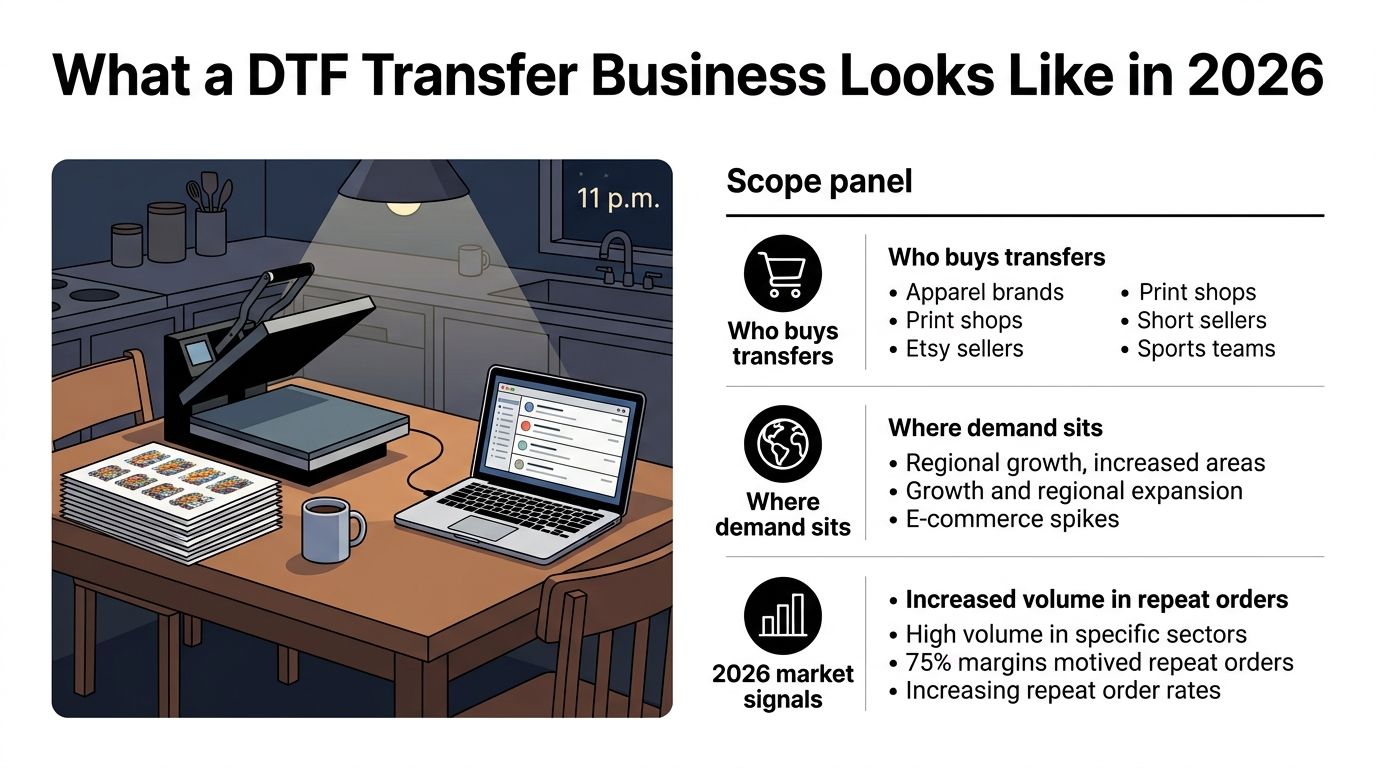
You've got orders coming in, but your “production floor” is still a kitchen table. It's late, the heat press is warm, a gang sheet is cooling beside a mug of cold coffee, and you're trying to decide whether the next purchase should be more film, a better press, or a printer of your own.
That decision determines whether your DTF transfer business becomes a dependable manufacturing operation or stays an exhausting side project. The winning approach is to treat every transfer as a product with a cost, a quality standard, a turnaround promise, and a customer segment. Revenue matters, but contribution margin, repeat orders, waste, and production capacity decide whether that revenue is worth the work.
What a DTF Transfer Business Looks Like in 2026
At 11 p.m., a serious operator isn't admiring a finished shirt. They're checking whether the printed gang sheets have cured evenly, whether the artwork is nested efficiently, and whether tomorrow's orders can ship without creating a quality problem. That mindset separates a DTF transfer business from a craft hobby.
DTF became a modern textile-printing category in the late 2010s, then moved into mainstream commercial adoption during the 2020s. The technology developed from inkjet-based textile experimentation before dedicated systems became commercially practical, making DTF a relatively recent business model compared with screen printing and DTG. This overview of DTF's development provides useful context for why the category still feels fast-moving.
The three buyers worth building around
Print-on-demand resellers buy ready-to-press designs or custom gang sheets, then sell finished garments through marketplaces and online stores. Their priorities are predictable color, simple ordering, clean cut lines, and a supplier who can support repeat designs without forcing them to own production equipment.
Small apparel brands need flexible production for launches, restocks, and limited collections. They care about consistency across garments, detailed artwork, and the ability to test designs without committing to large inventory runs.
Hard-surface crafters work with products such as tumblers, glass, acrylic, phone cases, and signage. Their buying pattern differs from apparel customers. They often need smaller batches, more application guidance, and a transfer that can tolerate handling and surface variation.
A healthy shop can serve all three, but it shouldn't market to all three with the same offer. Create separate product pages, sample packs, turnaround promises, and pricing logic for each buyer type.
Treat the transfer as the product
You're not selling a shirt. You're manufacturing an intermediate product that another person will apply to a shirt, bag, garment, or hard surface. That changes the P&L.
Track film usage, ink, powder, labor, spoilage, packaging, payment fees, shipping, maintenance, and reprints. A transfer that looks profitable before reprints and labor may be unprofitable after them. The market is already large enough to support specialist suppliers. A 2026 forecast estimates the direct-to-film printing market at USD 2.89 billion in 2025, reaching USD 4.56 billion by 2032, while a related printer-market forecast estimates USD 2.68 billion in 2025 and USD 4.25 billion by 2032. The market forecast describes a growing category, not an automatic business opportunity.
Start by choosing one core buyer, one repeatable offer, and one quality standard. Add adjacent applications only after the first workflow produces consistent orders.
Inside the DTF Production Workflow
DTF production is a chain. A mistake at the front often appears as a customer complaint at the end, which is why rushing one stage rarely saves time.
Start with artwork, not the printer
Artwork preparation begins with transparent backgrounds, clean edges, correct dimensions, and a resolution appropriate to the final design. Remove stray pixels and inspect small text at actual print size. A mockup can look perfect while the production file contains a weak edge, an unwanted background, or a white layer that will print too heavily.
RIP software then translates the design into printable instructions. Color profiling, ink limits, white-ink density, mirroring, and layer order all belong here. If you skip color management, the printed gang sheet can differ sharply from the customer's approved artwork. If you overbuild the white underbase, the transfer may feel heavier and consume more ink and powder than necessary.
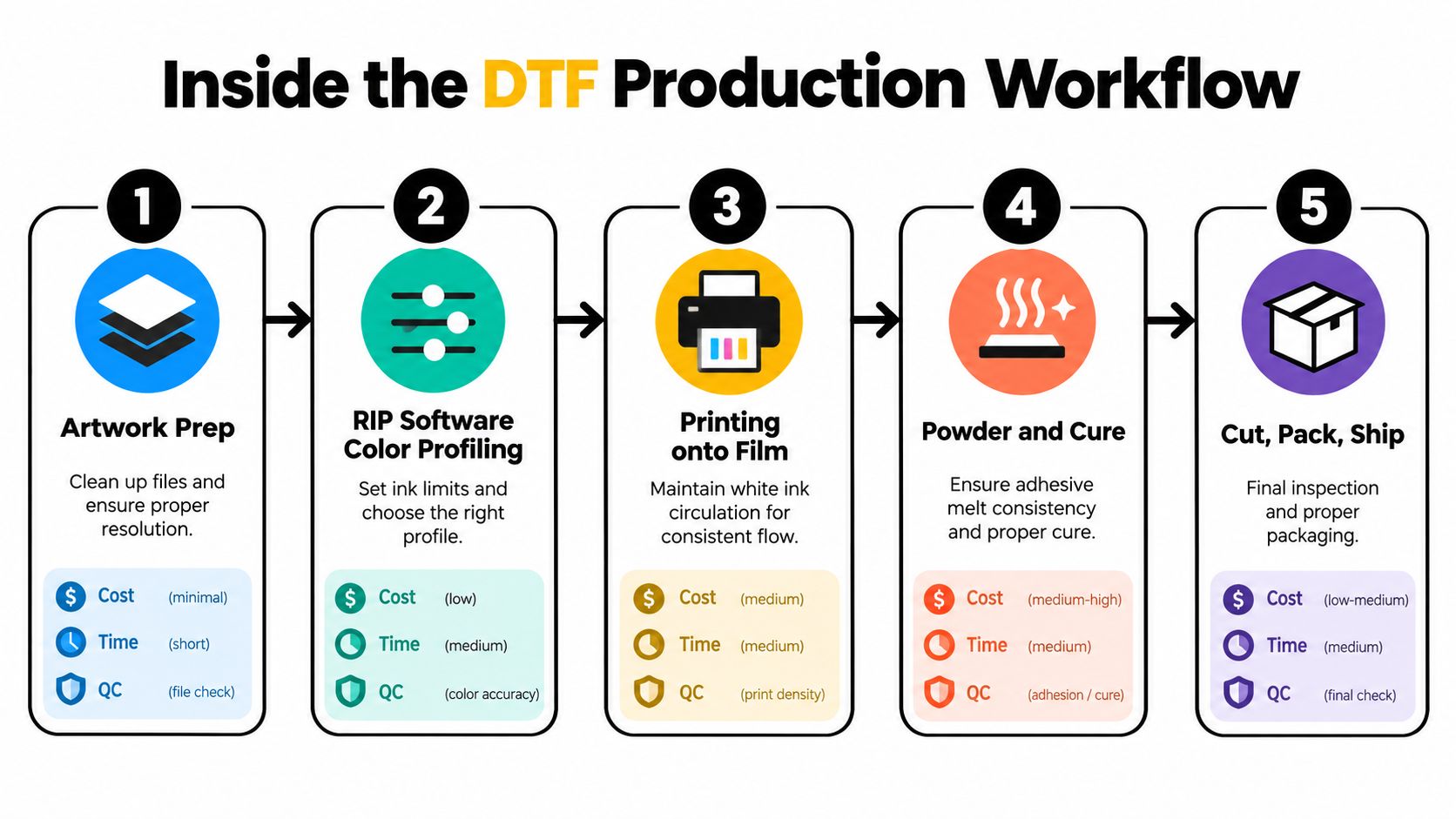
The connected sequence is straightforward:
- Prepare the file. Clean the artwork, confirm dimensions, and inspect fine details.
- Configure the RIP. Set the color profile, ink limits, white layer, and print mode.
- Print onto PET film. The printer lays down color and white ink in the correct sequence. White-ink circulation and nozzle checks are routine controls, not optional extras.
- Apply hot-melt powder. Powder must cover the adhesive areas evenly. Excess powder increases mess and can affect feel, while insufficient powder leaves weak bonding.
- Cure the adhesive. Heat must melt the powder consistently without damaging the film or over-curing the adhesive.
- Cut, inspect, and pack. Remove waste, check edges and color, label the order, and protect the transfer during shipping.
For a practical overview of the process, use this guide to making DTF transfers. If you outsource printing, you still need to understand these stages because your application instructions and quality checks depend on them.
Where quality failures begin
Powder curing deserves special attention. A transfer can look excellent immediately after curing and still fail during washing if the adhesive hasn't melted correctly. One peer-reviewed test reported complete QR-code scannability on cotton and polyester after five wash cycles, with recognition time around one second and wash-fastness ratings of Grade 4–5 under ISO 105-C06:2010(C2S). The test used a conditioned specimen, a sewn multifiber sample, and a defined detergent and sodium perborate protocol, so treat it as a benchmark for controlled testing rather than a promise for every setup. The technical datasheet and study reference shows why repeatable test conditions matter.
Production timing depends on equipment, artwork, sheet size, and operator handling. Don't promise a turnaround based only on printer speed. Measure the full cycle, including file review, printing, powdering, curing, cutting, inspection, packing, and rework. Your slowest stage is the capacity limit.
Equipment and Materials You Actually Need
The smartest starting setup may not include a DTF printer. If your customers already need transfers rather than finished garments, buy or outsource the printed intermediate product and invest first in a dependable heat press, sample inventory, packaging, and sales systems. Owning a printer makes sense when order volume, quality control, and repeat demand justify the maintenance burden.
Minimum setup versus production setup
| Equipment Item | Minimum Viable Setup (Price) | Recommended Setup (Price) | What Under-Spending Costs You |
|---|---|---|---|
| Heat press | Quote based on platen size and pressure consistency | Quote based on repeatability, safety, and serviceability | Uneven pressure, incomplete adhesion, and reprints |
| DTF printer | Outsourced transfers or an entry printer selected after testing | Dedicated production printer with service support | Downtime, nozzle issues, and inconsistent color |
| RIP software | Compatible software with essential white-ink controls | Calibrated workflow with profiles and saved production presets | Color variation and wasted film |
| Powder application and curing | Manual powdering with controlled curing | Powder shaker and curing unit matched to throughput | Uneven adhesive coverage and wash failures |
| PET film and powder | Small tested batches from a stable supplier | Standardized film and powder with backup sourcing | Film waste, edge lift, and unpredictable results |
| Finishing tools | Hand cutting, inspection light, and organized packing | Cutter, rewinder, storage system, and dedicated QC station | Slower fulfillment and damaged transfers |
| Maintenance supplies | Cleaning and nozzle-check materials | Planned maintenance inventory and documented procedures | Longer downtime and emergency purchasing |
Prices vary too much by region, supplier, service agreement, printer format, and whether you're buying new or used equipment to publish a responsible universal starter total. Don't build a budget from a single machine listing. Build it from equipment plus consumables, spare parts, ventilation, workspace, software, shipping materials, and working capital.
Under-spending on powder or film is particularly expensive. A cheap consumable can create inconsistent adhesion, forcing you to reprint orders or explain failures to customers. Over-spending creates a different problem. A large industrial setup can sit idle while you're still learning how to sell and schedule production.
Use this guide to choosing a DTF printer for T-shirt printing as a comparison starting point, but make the final decision from your actual order profile. Ask suppliers about service response, replacement parts, ink compatibility, and test files before you commit.
Operator rule: Buy capacity for the orders you can prove, not the orders you hope to receive.
Standardize one film, one powder, one ink system, and one press profile before adding more variables. A smaller, repeatable stack beats a larger stack that produces different results from one batch to the next.
Cost Structure, Pricing, and Profit Margins
A DTF transfer business becomes profitable when the owner knows the cost of a usable transfer, not merely the cost of ink on film. Your spreadsheet should separate variable production costs from operating overhead and then track reprints as their own category.
Build the cost model from invoices
Use your supplier invoices and production logs to calculate:
- Film cost, measured by the actual area consumed, including spacing and discarded sections.
- CMYK and white ink usage, based on RIP estimates and periodic physical inventory checks.
- Hot-melt powder, including waste from application and cleanup.
- Electricity, especially for curing equipment and heat presses used throughout the day.
- Maintenance, including cleaning supplies, dampers, wipers, filters, and service.
- Labor, including artwork review, customer communication, production, inspection, and packing.
- Fulfillment, including packaging, payment processing, shipping, and replacement orders.
| Cost Component | Unit Cost | Per Transfer (A4) | Per Shirt (Applied) |
|---|---|---|---|
| PET film | Your invoice cost per usable area | Area consumed plus waste | Transfer area allocated to the garment |
| CMYK ink | Your measured cost per print job | RIP estimate verified against inventory | Transfer cost divided by applied units |
| White ink | Your measured cost per print job | White-layer coverage and density | Transfer cost allocated by design size |
| Hot-melt powder | Your measured cost per usable batch | Powder consumed plus waste | Transfer cost allocated to the garment |
| Electricity | Your local utility rate and machine usage | Curing and printing time | Production time allocated per shirt |
| Labor | Your loaded hourly labor cost | Review, production, QC, and packing | Applied pressing and finishing time |
| Reprints | Your historical failure cost | Average failed units per order | Expected replacement cost per garment |
Don't publish a price until you know whether you're selling by design, area, sheet, or applied garment. Those models suit different buyers. Wholesale customers want predictable sheet pricing and reorder consistency. Retail customers pay for convenience, customization, and support. Etsy and Shopify buyers may accept a higher price when the product page removes uncertainty around file setup, application, and delivery.
Use fill rate to expose false margin
A gang sheet with sixteen designs can be efficient or wasteful depending on the dimensions, spacing, and customer mix. Calculate the usable printed area, then divide the total sheet cost by the number of sellable transfers. Run the calculation at low, typical, and high fill rates. This reveals why a sheet that looks inexpensive can become costly when designs are scattered across the film.
Your pricing tiers should reflect service, not just color count:
- Budget: standardized sizes, limited revisions, and predictable turnaround.
- Mid-market: better file support, mixed designs, and repeat-order handling.
- Premium: custom layout, tighter quality control, priority scheduling, and account support.
Keep wholesale discounts tied to operational savings. A larger order should reduce setup and packing effort, not automatically erase your margin. If the customer still needs individual cutting, labeling, file corrections, and rush handling, the order may not deserve a deep discount.
Gang Sheets, Turnaround, and Daily Output
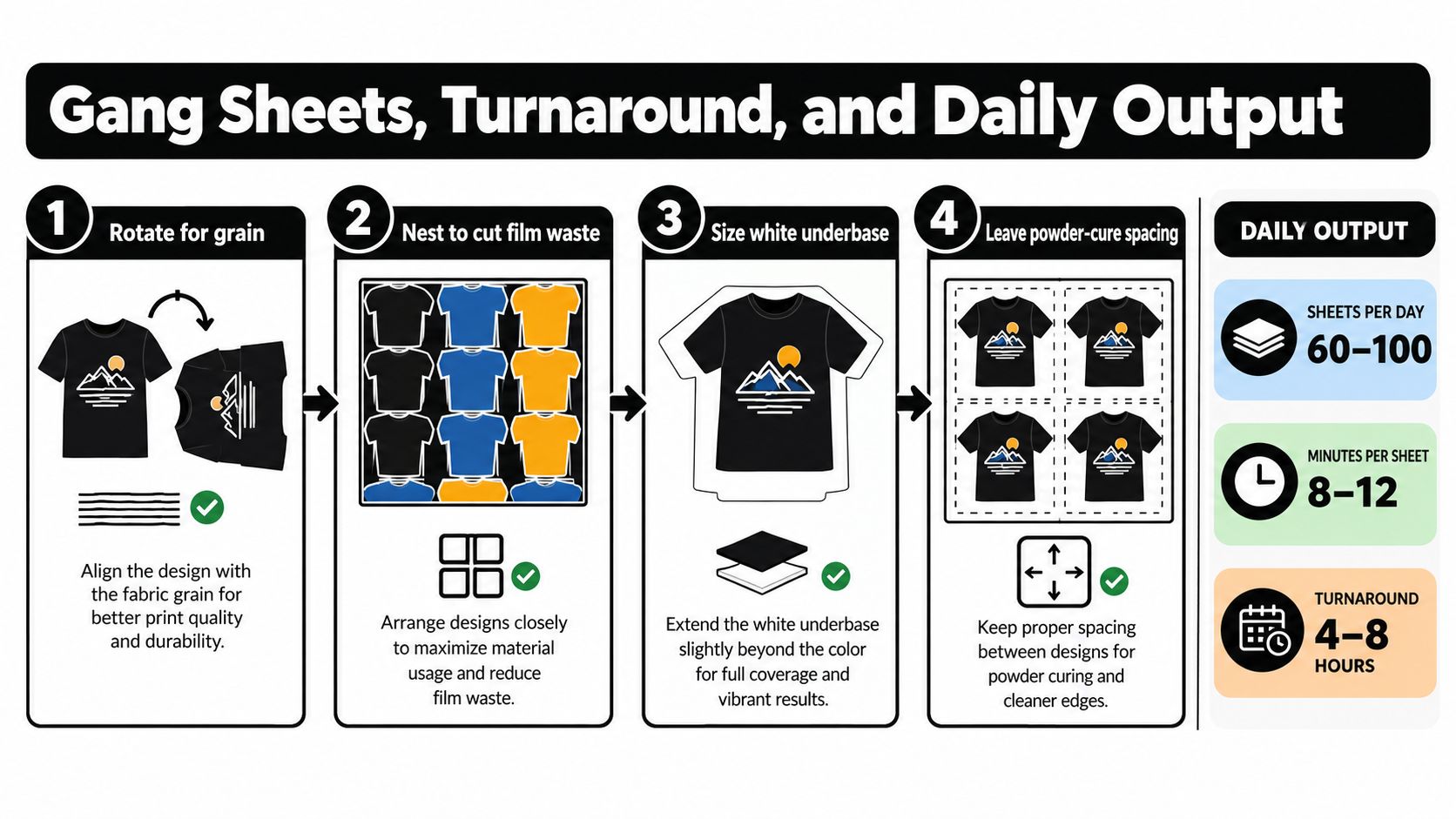
Gang-sheet efficiency starts in the layout file. A careless layout wastes film, complicates cutting, and increases the chance that powder spreads between designs. A disciplined layout turns the same production run into more sellable units without lowering quality.
Build templates for buying patterns
Create named templates instead of rebuilding every sheet from scratch. Useful categories include small logos for resellers, chest prints for apparel brands, full-front designs, and team or event orders.
Rotate artwork when the design's shape or the garment application process benefits from a consistent orientation. Nest shapes tightly while preserving enough space for cutting and powder control. Size the white underbase deliberately instead of allowing the RIP to generate an unnecessarily broad layer. Leave a clean margin around each design so adhesive powder doesn't bridge separate transfers.
The best layout isn't the one that fits the most artwork at any cost. It's the one that produces the highest number of usable, easy-to-cut transfers with minimal rework.
Schedule the work as a queue
A productive shift has distinct stages:
- Review and queue files by deadline, material, and customer.
- Print compatible jobs together to reduce profile changes and cleaning interruptions.
- Powder and cure immediately according to the film and powder supplier's tested settings.
- Cool, inspect, and cut before the transfer enters packing.
- Pack by order, not by design, so the shipping station doesn't create a second sorting job.
Technical guidance lists a transfer temperature of 200–230°C for 20–30 seconds and pressing conditions of 150–170°C for 8–15 seconds, but these are operating windows, not universal recipes. The DTF film guidance warns that temperature and dwell time vary across film suppliers. Standardize one film, powder, and press combination, then run controlled wash tests before accepting volume orders.
For layout examples and practical sheet organization, use this DTF transfers gang sheet guide. Measure output by sellable transfers that pass inspection, not by raw sheets printed. That distinction keeps speed from hiding waste.
Choosing Your Lane, Apparel, UV-DTF, or Hybrid
The right lane depends on who already trusts you, what space you have, and which production problems you're willing to manage. Don't choose UV-DTF because it looks novel, and don't choose apparel because it seems familiar. Choose the lane where your existing customer access gives you the shortest path to repeat orders.
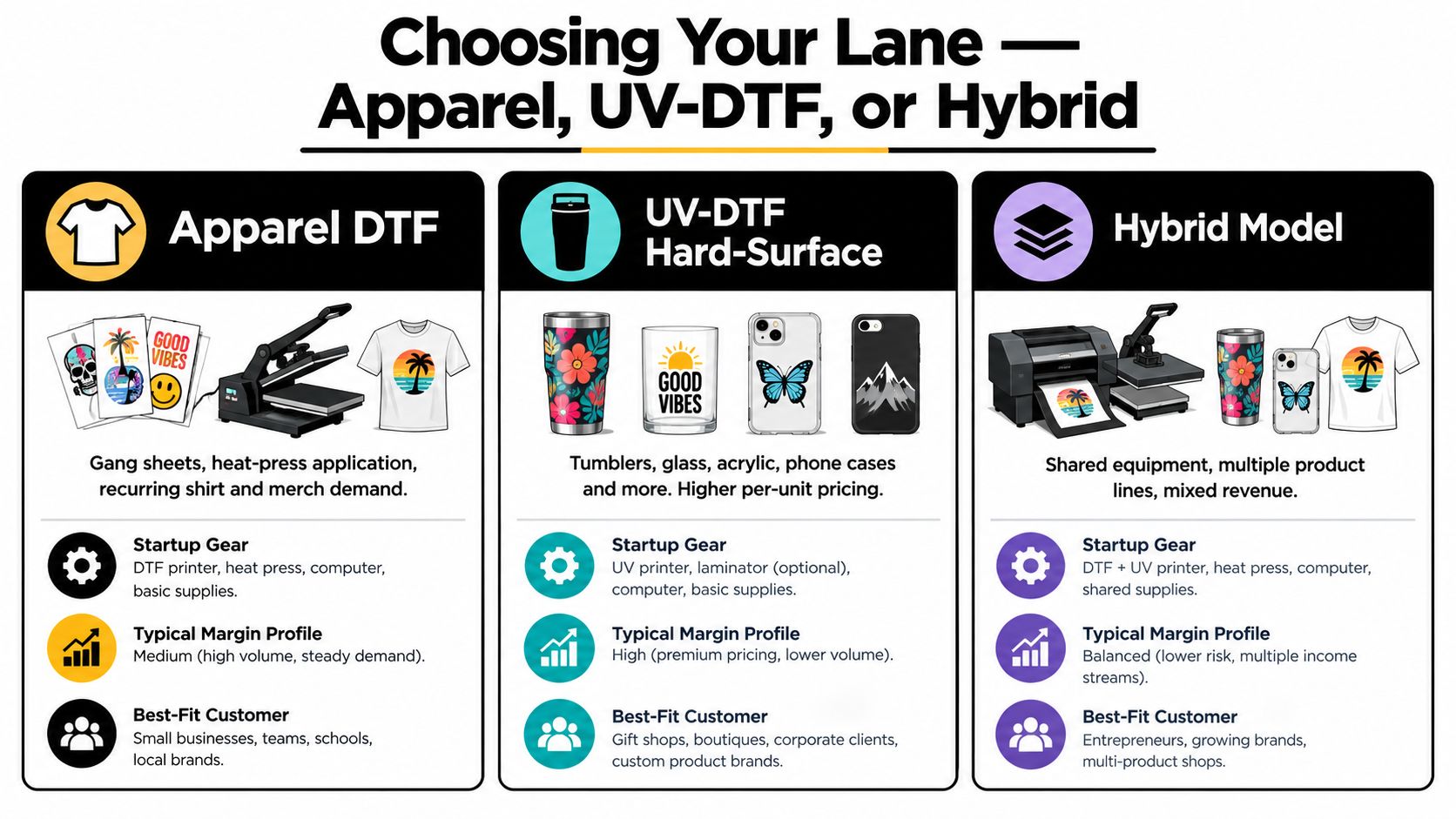
Apparel DTF
Apparel DTF is the clearest starting point for operators connected to clothing brands, screen printers, sports teams, event planners, or online resellers. You can sell gang sheets, finished garments, or both. The workflow is familiar: print or source the transfer, position it, press it, inspect the garment, and pack it.
The main operational challenge is variety. Garment fabric, color, size, press pressure, peel method, and customer artwork all introduce variables. Build samples across the materials you intend to support, then publish application instructions that match those tests.
UV-DTF hard surface
UV-DTF expands the addressable product range into glass, plastic, metal, acrylic, phone cases, and signage. Recent industry coverage identifies hybrid workflows, wider color gamuts, and broader material compatibility as important directions, while UV-DTF creates opportunities outside apparel. The DTF market report is useful for identifying these applications, but technical possibility doesn't prove profitability.
Choose this lane if you already know crafters, promotional-product buyers, or businesses needing branded hard goods. Test surface preparation, adhesion, scratch resistance, packaging, and customer handling before promising durability.
Hybrid production
A hybrid shop can serve apparel and hard-surface buyers, but it carries more complexity. You'll manage different equipment, consumables, artwork standards, application instructions, and customer expectations. The upside is a broader offer and more opportunities to increase order value.
Start hybrid only when one lane already has a stable workflow. Shared administrative systems help, but shared attention can become a bottleneck. Keep separate inventory locations, production checklists, sample sets, and quality records.
Choose the lane that matches your current network. Equipment should follow demand, not substitute for it.
Launch Plan, Growth Levers, and Risks to Plan For
Launch the business in controlled stages. First, choose a narrow customer group and create a small sample library that proves the exact products you intend to sell. Include finished transfers, applied garments or hard-surface samples, care instructions, file requirements, and a clear turnaround promise.
Next, lock the operating inputs. Test film, powder, ink, press settings, packaging, and wash or handling performance. Record the results in a production sheet that another person could follow. If a setting exists only in your memory, it isn't a process.
Build the sales engine around repeatability
Open the channels where your buyers already operate. A Shopify store can support branded product pages and reorder flows. Etsy can help reach design-led buyers. Local screen-printing businesses, promotional-product companies, makerspaces, and boutique brands can provide account-level demand.
The strongest growth levers are operational:
- Bulk purchasing: negotiate supplier terms only after your usage is predictable.
- Private-label accounts: offer consistent transfer specifications and reorder support to small brands.
- Saved artwork libraries: make repeat orders faster by preserving approved files and layouts.
- Reorder plans: remind customers to replenish proven designs instead of constantly chasing new buyers.
- Production outsourcing: use a transfer supplier when owning a printer would add maintenance without enough utilization.
The category also carries real risks. Market analysis identifies consumables price volatility, concentrated ink and film supply, environmental regulation, and competition from alternative decoration methods. This market analysis estimates the global DTF market at about USD 2.72 billion in 2024, with a projection of USD 3.92 billion by 2030, and reports that global DTF print volume exceeded 7.2 billion prints in 2024. Those figures describe market scale, not your margin.
Protect the business with dual sourcing for critical consumables, documented quality tests, backup production options, and enough working capital to handle supply interruptions. Publish a written service-level agreement covering file approval, production, shipping, rush orders, and reprints. Don't let one printer, one supplier, or one large customer become the entire business.
Raccoon Transfers offers DTF and UV-DTF transfers for apparel and hard-surface applications, including custom gang sheets and uploaded artwork workflows. If you want to validate your designs without buying a printer first, visit Raccoon Transfers and compare a sourced-transfer workflow against the equipment and margin model you've built.